Excellence through Innovation


| home |
| software •iPhone •print industry •health care •other |
| about us |
| clients |
| contact |
iPhone Software |
Psalm Daily Quotes
Taken from the
Software for the
iPhone and iPod Touch
Click button to buy at Apple iTunes Store
Start your day with a quote from the Psalms or browse through the hundreds of quotes in the collection. You will find each quote to be thought provoking and uplifting.
The NIV was created and is maintained with the mandate to accurately and faithfully translate the original Greek, Hebrew, and Aramaic biblical texts into clearly understandable English.
More than 100 scholars from six English-speaking countries, as well as editors and English stylists, worked on the NIV. The scholars represented more than 20 denominations.
It took 10 years to complete the NIV translation. The process started in 1968 and finished in 1978. This does not include more than 10 years of planning before 1968.
The NIV is the most widely accepted contemporary Bible translation today. More people buy the NIV Bible than any other English-language translation.
Each quote is set against a beautiful nature image background. What's the difference? This application is more than just a verse and pretty picture. Each picture has been carefully chosen to match the verse below through some keyword or concept whenever possible. You will enjoy seeing how images of cuddly creatures, mountains, stars, sunsets, sheep, penguins and more make the inspirational verse more interesting and meaningful. Elegance and ease of operation characterize this application. The inspirational verse of the day is delivered quickly and additional verses are available with the tap of a finger. Software Features
New International Version
Scriptures taken from the Holy Bible, New International Version®, NIV®. Copyright © 1973, 1978, 1984 by Biblica, Inc.™ Used by permission of Zondervan. All rights reserved worldwide. www.zondervan.com
The “NIV” and “New International Version” are trademarks registered in the United States Patent and Trademark Office by Biblica, Inc.™
Photo Credits
Developer Notes Operational Notes
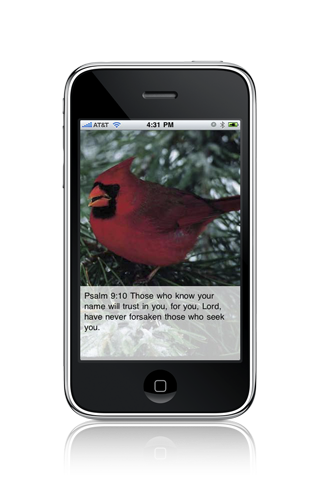
Upon launching, the daily quote is automatically presented. If you wish to view tomorrow's quote, tap the screen in the middle right area. If you wish to view yesterday's quote, tap the screen in the middle left area. You can advance the quotes forward or backward as far as you want with additional taps. It is also possible to view the quotes in a random order by tapping the top of the screen.
Below are additional screen shots from the collection.
|

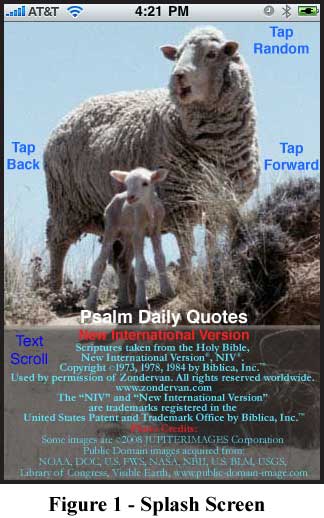 The splash screen in Figure 1 indicates the simple operation
of the application. The quote text occupies the lower third of the screen on a
semi-transparent background. If the quote is longer than the box, it can be
scrolled by swiping a finger up or down within the box.
The splash screen in Figure 1 indicates the simple operation
of the application. The quote text occupies the lower third of the screen on a
semi-transparent background. If the quote is longer than the box, it can be
scrolled by swiping a finger up or down within the box. Figure 2 shows a case where the entire quote fits within the
text box. The reference for each Psalm excerpt is clearly presented on each screen. If you wish to read further than the excerpt, there are many fine iPhone Bible applications.
Figure 2 shows a case where the entire quote fits within the
text box. The reference for each Psalm excerpt is clearly presented on each screen. If you wish to read further than the excerpt, there are many fine iPhone Bible applications.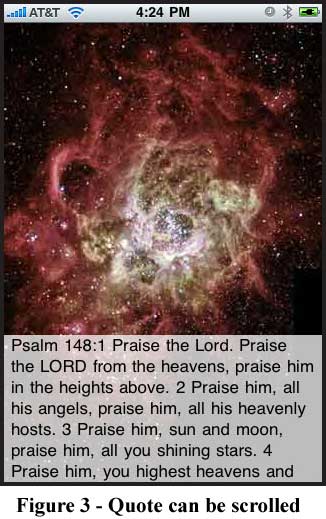 In Figure 3 you will notice that the entire quote does not
fit in the text box. In order to view the rest of the quote, you can use an up or down
swipe gesture within the text box to scroll the text.
In Figure 3 you will notice that the entire quote does not
fit in the text box. In order to view the rest of the quote, you can use an up or down
swipe gesture within the text box to scroll the text.



|
|
|